CSS学习笔记(1)基础知识
272字
2 min read
Table of Contents
选择器
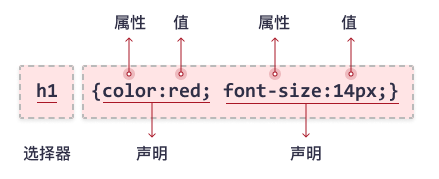
文本属性
字体样式
serif, sans-serif, monospace, cursive, fantasy
@font-face { font-family: ""; src: url("");}字体大小
font-size: 15px
font-size: 150% 父元素的150%大小
font-size: 1.5em 父元素的1.5倍
这俩作用差不多
.body { font-size: small;}xx-small x-small small medium large x-large xx-large 每个大小大约比前一个大小大20%
设定规则
- 选择一个关键字如small/medium,指定它作为body规则中也就是默认的字体大小
- 使用em/百分数,相对于body字体大小指定其他元素的字体大小 这样调整页面字体大小方便一些,按比例的牵一发而动全身。
字体风格
font-weight:normal
font-style:italic
italic:斜体文本
oblique:倾斜文本
指定颜色
background-color: rgb(80%,40%,0%)rgb: red, green, bluergb(204,102,0)255的80%是204,255的40%是102,0%是0#cc6600每组两位数字分别代表颜色的红绿蓝分量(从0到255的数) hexadecimal:16进制计数系统 0123456789ABCDEF 如cc→12*16+12=204 66→6*16+6=102
盒模型
一个板块的属性
.p{ border-color: black; border-width: 1px; border-style: solid; background-color: #a7cece; padding: 25px; padding-left: 80px; margin: 30px; margin-right: 250px; background-image: url(https://sample.com/images/bkgrd.gif); background-repeat: no-repeat; repeat-x, repeat-y,inherit background-position: top left;}布局
float(浮动)目标是让元素属于半脱离文档流的状态
浮动布局 float 凝胶布局
.container { max-width: 1200px; margin: 0 auto; /* 水平居中 */ width: 90%; /* 小屏时占满90% */}绝对布局
position: absolute
表格显示布局
.table { display: table; width: 100%;}.row { display: table-row;}.cell { display: table-cell; vertical-align: middle; /* 垂直居中 */}position
static relative absolute fixed sticky